businessman in stressful situation analyzing financial data on large screen in dark conference room

The Hidden Cost of Enrollment Inaccuracy, And How to Make It Visible.

todayLast Updated: June 18, 2026

schedule10 min. read

Key Takeaways


  • Enrollment inaccuracy is a compounding defect that spreads cost across the enterprise.
  • Most organizations undercount the impact because budgets and metrics are siloed.
  • A defect cost ledger makes hidden rework visible using touch counts, time, and downstream corrections.
  • Prioritize recurring defect families and control points, not just faster clean up.
  • Shared governance across enrollment, service, claims, and billing is the difference between episodic fixes and sustained accuracy.

The misconception: Enrollment errors are just an enrollment problem

Enrollment operations often carries the blame for eligibility and coverage issues, so the instinct is to add more staff, tighten service level agreements, or accelerate work queues. That approach can improvethroughput, but it rarely changes the underlying demand.

Enrollment inaccuracy behaves more like a quality defect than a workload spike. One incorrect effective date, one missing dependent, or one plan selection mismatch can touch customer service, claims, billing, employer groups, downstream vendors, and your data platform before it is fully resolved.

The hidden cost isn’t the first fix. It’s the second and third fix, plus the work your teams do to explain, reconcile, and correct the ripple effects.

Scaling enrollment work is often treated as a capacity issue - hire more people, add overtime, or automate the queue.

At enGen, we see a consistent pattern: the same defect patterns repeat, and the cost shows up most clearly outside enrollment, in contact drivers, claim pend rates, and billing corrections. Accuracy is not an enrollment metric. It is an enterprise operating metric.

Enrollment errors do not stay in enrollment. They become enterprise rework.

Why the cost stays hidden, and why that matters to leaders

For senior leaders, enrollment accuracy shows up as administrative cost, call volume, or claims adjustments. For enrollment leaders, it shows up as backlog, file quality, and exception handling. The same defect is being measured in different ways across the organization.

When costs are distributed, ROI is hard to prove. A fix that requires investment in upstream validation, governance, or controls might be funded by enrollment. The benefits, fewer calls, fewer reprocessed claims, fewer reconciliations, accrue to other areas. No one function feels the full pain or captures the full savings.

If you can’t see the full cost, you will keep optimizing the wrong part of the system.

Two diverse payer operations colleagues collaborate in a service operations area, one reviewing a call driver dashboard on a monitor, another referencing a claims pend queue on a second monitor.

The compounding cost chain, where enrollment defects travel

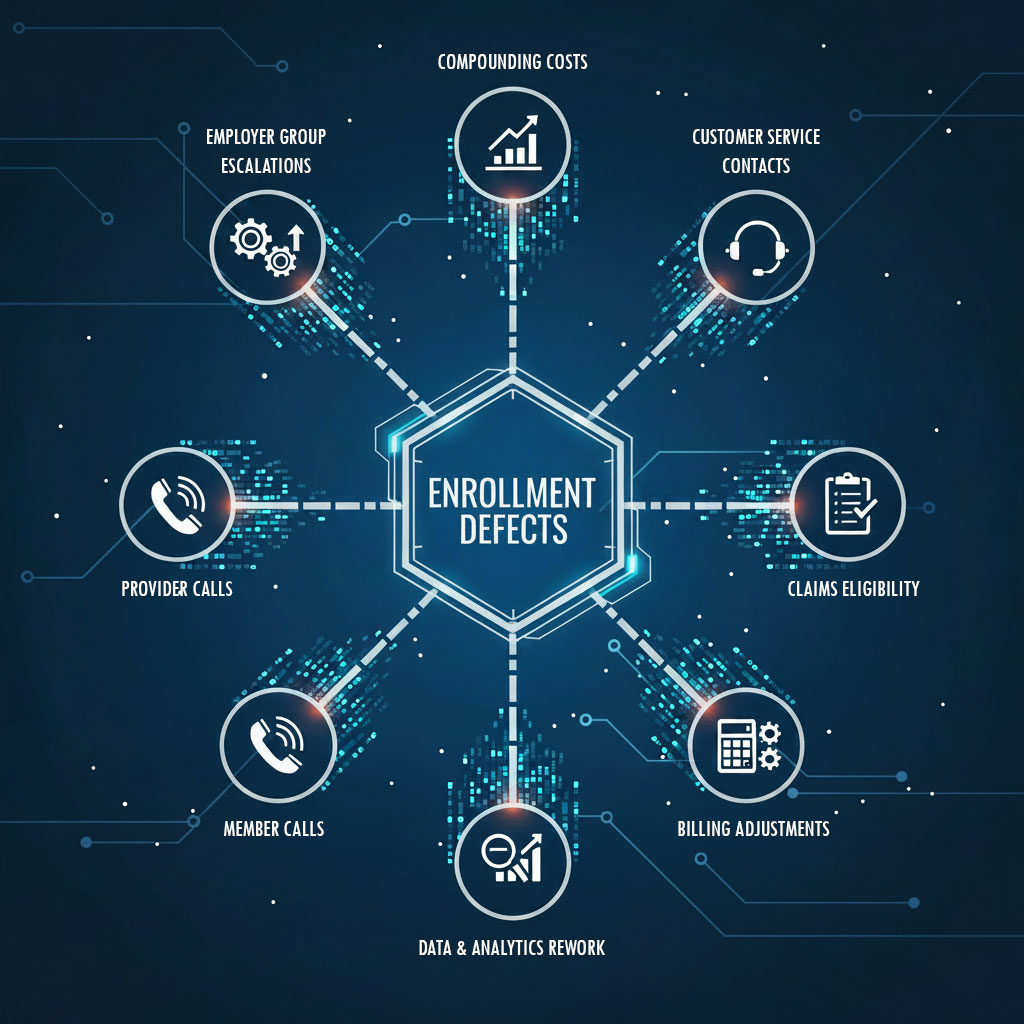
Enrollment defects follow predictable routes. The exact path varies by plan design and systems, but the pattern is consistent across payer operations.

Downstream touch points you can measure:

  • Customer service contacts tied to eligibility, benefits, or premium questions.
  • Claims that pend or deny for eligibility, coordination of benefits, or coverage dates.
  • Provider calls and appeals when eligibility does not match contracted expectations.
  • Billing and premium reconciliation work, including retroactive adjustments.
  • Employer group escalations for file corrections, roster disputes, and exception approvals.
  • Data and analytics rework when member records, attribution, or risk adjustment inputs are inconsistent.

If you cannot price the defect, you cannot justify fixing it.

A simple table for defect families and where costs show up

Use this table as a starting taxonomy. The goal isn’t perfection. The goal is to sort defects into repeatable families so cost can be estimated consistently.

Defect family

Typical trigger

Where it shows up

Common downstream work

Effective date and termination errors

Late or incorrect start and end dates

Service, claims, billing

Eligibility disputes, claim rework, retro premium adjustments

Dependent and relationship mismatches

Missing dependents, wrong relationship codes

Service, claims

Coverage verification calls, claim denials, manual overrides

Plan selection and benefit package mismatches

Wrong plan loaded or mapped

Claims, provider, service

Benefit reprocessing, provider inquiries, appeals

Identifier and demographic inconsistencies

Member ID, name, address mismatches

Service, data, providers

Duplicate record clean up, directory updates, member outreach

Group and employer file defects

File layout issues, missing fields, timing

Enrollment, employer ops, service

File corrections, exception handling, escalations

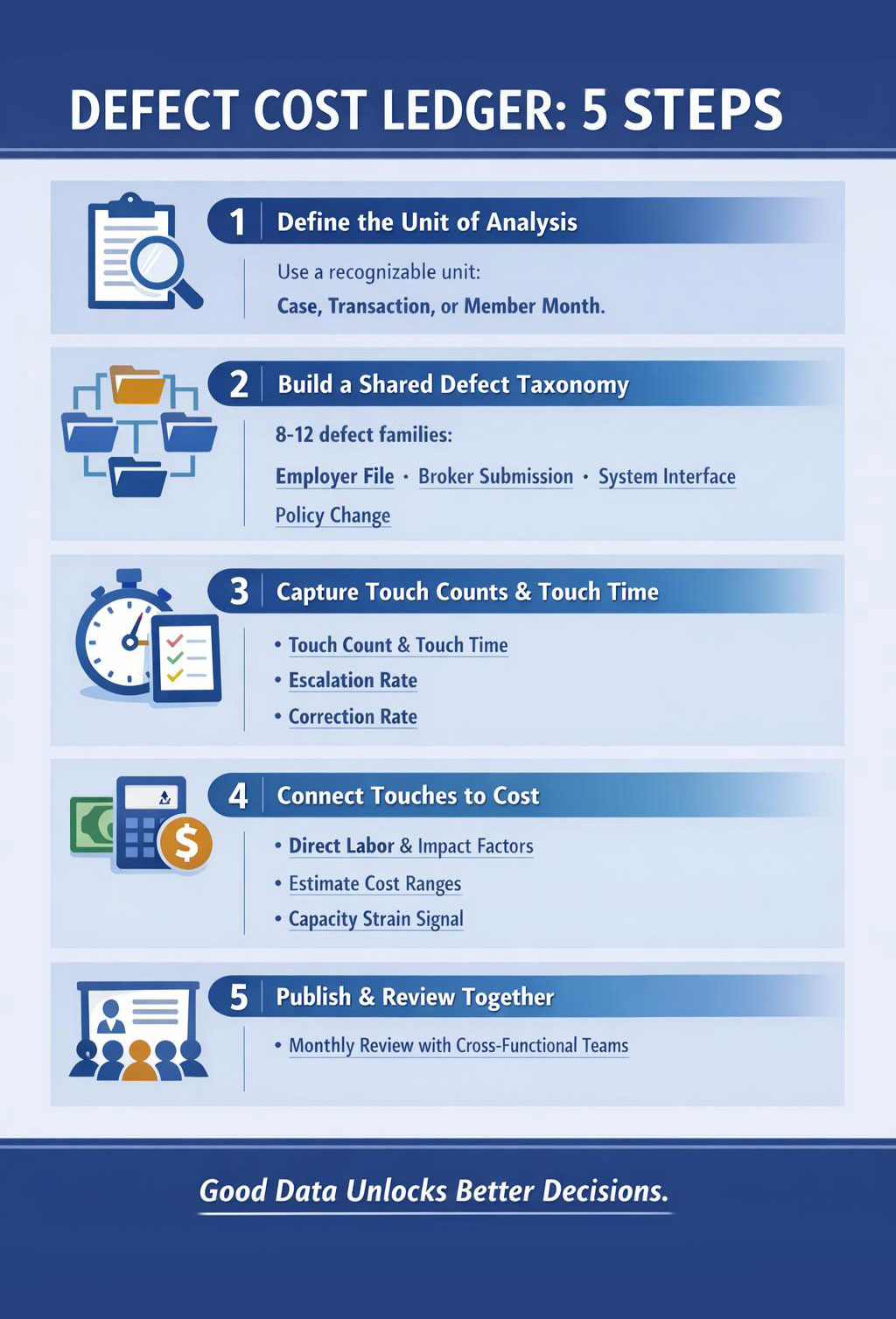
infographic highlighting the five steps associated with implementing a defect cost ledger

The defect cost ledger, a practical framework you can implement

A defect cost ledger is a cross-functional view of the work triggered by enrollment defects. It’s a shared model, often maintained in a spreadsheet or analytics workspace, that connects defect types to the operational touches they create.

Think of it as a bridge between operational reality and financial language. It helps leaders decide where to invest by showing the total cost of rework, not just the cost of the first fix.

Step 1: Define the unit of analysis

Pick a unit that your teams can recognize and track. Common options include a case, a transaction, or a member month. Member month is a common unit in payer operations, meaning one member enrolled for one month, but you can use simpler units if your reporting is limited.

Step 2: Build a shared defect taxonomy

Start with 8 to 12 defect families. Use operational language. Avoid technical codes that only one team understands. Map each family to common sources, employer file, broker submission, internal maintenance, system interface, or policy change.

Step 3: Capture touch counts and touch time

For each defect family, estimate:

  • Touch count: how many work touches typically occur end to end.
  • Touch time: average minutes per touch, by function.
  • Escalation rate: how often it becomes a supervisor case, grievance, or employer escalation.
  • Downstream correction rate: how often it triggers claim adjustment, billing correction, or retroactive change.

If you have time tracking and case tags, use them. If you don’t, use structured sampling. A two week sample of tagged contacts and claim pend reasons can be enough to estimate ranges.

Cost modeling is often treated as a finance exercise that requires perfect data before it begins.

In our experience working with payer operations, the fastest progress comes from pairing finance with frontline leaders to create a good enough ledger, then improving precision over time as tagging and data quality mature.

You don’t need perfect data to start. You can unlock investment decisions with directional clarity, then refine the model as controls take hold.

Step 4: Connect touches to cost without overpromising

Estimate cost by multiplying touch time by volume, then applying a downstream impact factor where appropriate. Keep it simple and transparent.

  • Direct labor estimate: average minutes per touch times loaded labor rate, if available, or relative effort if not.
  • Downstream impact factor: a multiplier for work that creates reprocessing, rework loops, or provider abrasion.
  • Capacity strain signal: a qualitative tag for peak season risk, for example open enrollment or group renewals.

The output should be a range. Ranges are more honest and still actionable.

Step 5: Publish a cross functional view and use it

The ledger only matters if it becomes a shared language. Review it monthly with enrollment, customer service, claims, billing, employer operations, and data leaders. Identify the top recurring defect families by total enterprise cost, not by enrollment backlog.

When leaders see the same defect through one ledger, prioritization stops being a debate and starts being a decision.


The ledger is less about accounting and more about alignment.

From ledger to prevention, where fixes succeed or fail

Once you can see the cost, the next question is where to intervene. Many efforts stall because they focus on cleanup, not control. Cleanup is necessary. Control is what reduces repeat demand.

Three control points that change outcomes

  1. Upstream validation before data enters core systems. This includes file checks, eligibility rules, and exception routing that prevents flawed inputs from becoming member record changes.
  2. Closed loop defect feedback. When downstream teams fix a defect, that signal must flow back to the source, employer file, interface mapping, or policy rule, so the defect does not recur.
  3. Clear ownership and governance. Every defect family needs an owner who can coordinate changes across systems and vendors, not just assign work to the queue.

Defect prevention can feel slower at first because it adds discipline. Over time it removes repeat work and stabilizes operations.

Quality programs are often designed as centralized initiatives with heavy documentation.

At enGen, we see prevention stick when it’s embedded into everyday workflows – clear intake rules, simple control checklists, and shared defect reviews that frontline teams can actually sustain. Governance should reduce burden, not add to it.

30-60-90 day plan strategy infographic diagram

How to start without boiling the ocean, a 30-60-90 day outline

First 30 days, make the invisible visible

  • Pick 3 defect families with high volume or high frustration signals.
  • Agree on shared definitions and tagging guidance across functions.
  • Run a short sampling effort to estimate touch counts and time.
  • Draft the first ledger with ranges and assumptions clearly stated.

Next 60 days, align on priorities and owners

  • Rank defect families by enterprise cost, not by where they originate.
  • Assign an owner per defect family with authority to drive cross system changes.
  • Identify 1 to 2 control points per defect family, validation, rules, routing, or upstream data checks.
  • Set a lightweight operating rhythm, monthly review, weekly working sessions for top defects.

Next 90 days, implement controls and measure demand reduction

  • Deploy control checklists and exception handling rules.
  • Establish closed loop feedback from downstream fixes to upstream sources.
  • Measure demand reduction using call drivers, claim pend reasons, and billing corrections tied to the defect families.
  • Refresh the ledger with real counts, and retire assumptions as data improves.

The objective is not a perfect model. The objective is a shared, repeatable way to prioritize prevention.

Common pitfalls, and how to avoid them

  • Treating the ledger as a one-time analysis. It should be a living artifact used for prioritization.
  • Overfocusing on enrollment productivity metrics. Productivity can improve while enterprise rework grows.
  • Asking for perfect data before taking action. Start with samples and improve accuracy over time.
  • Fixing symptoms in downstream teams. If the source is not addressed, demand returns.
  • Underestimating change management. New tagging, new controls, and new governance require coaching and reinforcement.

A strategic takeaway for leaders

Enrollment inaccuracy is a compounding cost – it creates work you don’t budget for and demand you don’t plan for. Leaders who treat it as a shared defect, priced across functions, create room for prevention investments that actually hold.

Enrollment accuracy is often discussed as a data quality issue or a system limitation.

At enGen, it shows up as an operating model issue – unclear ownership, weak signal flow, and controls that don’t match real-world operations.

The path to accuracy is less about one big system change and more about consistent, cross-functional control over time.

Prevention is a leadership decision, not just an operational tactic.

If you’re trying to build a clearer business case for enrollment accuracy and prevention, a short conversation can help you pressure test your defect taxonomy and ledger approach. Contact enGen to compare notes on what strong, cross functional defect governance looks like in practice.

FAQs

Enrollment inaccuracy is any mismatch between what should be true about a member's coverage and what is recorded across systems, such as eligibility dates, plan selection, dependents, or identifiers.

Claims and billing rely on eligibility and benefit data. When enrollment data is wrong, claims may pend or deny and billing may require retroactive adjustments, creating rework across multiple teams.

A defect cost ledger is a shared model that links defect families to the operational touches they create, including touch counts, time, escalations, and downstream corrections, so leaders can see total enterprise impact.

No. You can start with structured sampling and ranges. Over time, improve precision by standardizing tags and capturing reasons for contacts, pends, and adjustments.

Rank defect families by enterprise cost and recurrence, not just by enrollment backlog. Focus on the defects that generate repeat downstream work and high escalation rates.

Look for reduced repeat contacts tied to eligibility and benefits, fewer claim pends for eligibility reasons, fewer retroactive billing corrections, and fewer escalations tied to the prioritized defect families.

Some sources, employer files, brokers, or member changes, are external. Even then, you can reduce impact through clearer intake rules, earlier validation, and faster closed loop feedback to improve upstream quality.