businessman interacting with a digital interface displaying open enrollment and healthcare icons

Why Manual Enrollment Processes Do Not Scale.

todayLast Updated: June 24, 2026

schedule9 min. read

Key Takeaways


  • Manual enrollment does not fail because people are slow. It fails because exceptions multiply decision work.
  • When humans act as the integration layer between sources and systems, volatility turns into backlog risk.
  • Start with digitized intake and validation to stop preventable errors at the door.
  • Then automate matching and routing, backed by an exception workbench, standard work, and controls.
  • Measure and learn from exceptions so the operation gets calmer over time, even as volume grows.

The misconception: More volume means more staffing

Most enrollment teams have the same playbook: volume goes up, you add temporary staff, approve overtime, and set up more checklists. It can work for a while. Then a peak hits and what breaks first is not throughput. It’s confidence in the data.

The common assumption is that manual enrollment is a capacity problem. The less obvious reality is that it’s a variability problem. When sources change, timing shifts, and eligibility rules collide, the work stops being repetitive and becomes investigative.

Scaling enrollment is often treated as a staffing exercise. At enGen, we see a consistent pattern: teams can add hands quickly, but they can’t add shared judgment and consistent controls at the same speed. Exception volume, not headcount, becomes the leading indicator of backlog risk.

If you’re responsible for enrollment operations, you know the moment when the queue shifts. Files arrive late. Retroactive adjustments stack up. A single employer sends a new layout without notice. The team spends the day triaging instead of processing.

Manual work is not a stable baseline. It is a risk surface that expands under volatility.

Manual enrollment doesn’t just cost more. It creates fragility.

illustration of how small exception rates create branching work and handoffs

Why manual work scales linearly, then breaks exponentially

Manual enrollment looks linear when the inputs are consistent. One more group file means one more batch of keying and reconciliation. But exceptions don’t add linearly. They create branching decision paths. Each branch triggers follow-ups, research, and rework across systems.

The hidden math: exception amplification

An exception is any record that can’t be processed with confidence using standard rules. It might be a missing subscriber identifier, a dependent mismatch, a plan selection that conflicts with eligibility, or a timing gap across effective dates. Every exception adds two kinds of work: decision work and coordination work.

Decision work determines what’s true. Coordination work aligns that answer across stakeholders and systems. In enrollment, coordination often spans human resources (HR), payroll vendors, benefit administration platforms, eligibility systems, and downstream billing or claims. That’s why a small rise in exception rate can feel like a full operational crisis.

Volume is visible. Exceptions are compounding.

Humans as the integration layer

Many organizations rely on people to connect the dots between sources and systems. An analyst spots a mismatch, interprets a policy, updates a spreadsheet tracker, sends an email for confirmation, then re-keys changes in another tool. This is integration by heroics.

The issue isn’t that people do this work. It’s that the work is invisible to the system. When knowledge lives in inboxes and personal macros, the operation can’t learn at scale. Training debt grows. Key-person risk increases.

If your operation depends on a few experts to keep enrollment consistent, growth will feel like fragility, not progress.

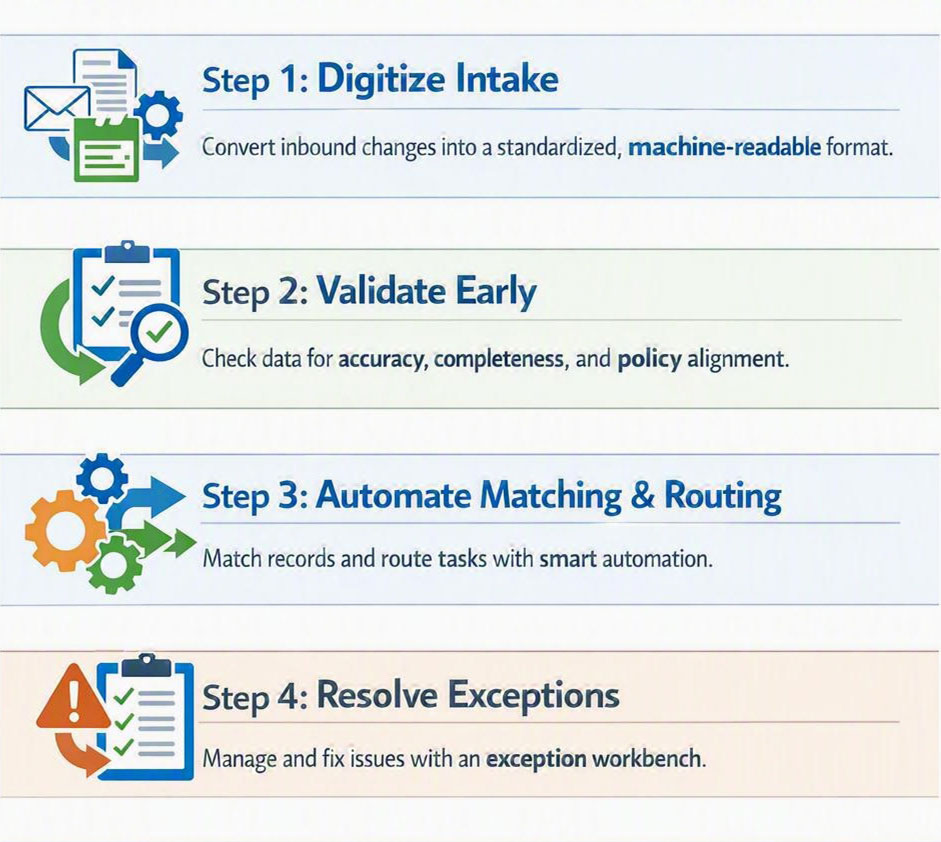
simple infographic illustrating a practical 4-step framework to digitize, validate, match, and resolve enrollment operations

A practical framework: Digitize, Validate, Match, Resolve

The fastest path to a more resilient enrollment operation isn’t to automate everything at once. It’s to move in a sequence that reduces volatility before it reaches your people. A useful mental model is Digitize, Validate, Match, Resolve.

Step 1. Digitize intake

Digitizing intake means converting inbound enrollment changes into a consistent, machine-readable format with traceability. This includes file ingestion, email or portal submissions, and any manual forms that still arrive as attachments. The point is not fancy technology. The point is consistency and auditability.

In practice, digitized intake includes simple conventions: standardized templates, version control for employer file layouts, and a single place to track inbound changes and their status. If a source changes, you want to detect it immediately, not after 500 records fail later in the workflow.

Intake is often treated as a front-door clerical task. In our experience working with payer operations, intake is where most avoidable rework begins, because small format or timing issues slip through unchecked. Improving intake discipline can reduce downstream exception load before you automate matching.

Step 2. Validate what you can, early

Validation is the set of checks that tell you whether the incoming change is complete, consistent, and eligible to proceed. Think of it as the difference between accepting any package at a loading dock and scanning it for damage before it enters the warehouse.

Validation checklist:

  • Required fields present and in expected formats
  • Effective dates align with policy rules and coverage periods
  • Identifiers match known patterns and reference lists
  • Coverage elections are internally consistent
  • File totals and record counts reconcile to sender expectations

Step 3. Automate matching and routing

Matching is the act of connecting an inbound record to the correct member, group, plan, and coverage timeline. Routing is deciding where the work goes next. This is where automation can remove repetitive joins and comparisons, as long as the rules are transparent and monitored.

A common pitfall is to automate matching without making the uncertainty explicit. If the system can’t match with confidence, it shouldn’t guess silently. It should flag the record, explain why, and route it to controlled exception handling.

Step 4. Resolve exceptions with an exception workbench

An exception workbench is a structured place where exceptions are queued, explained, worked, and closed with an audit trail. It’s not a shared inbox. It’s a workflow with roles, reason codes, and feedback loops.

Exception workbench essentials:

  • Clear reason codes for why a record failed validation or matching
  • Assigned ownership and targets for categories of exceptions
  • Standard work steps for the top exception types
  • Controls such as dual review for high-impact changes
  • A closed loop that feeds resolved patterns back into validation rules

Automation is not the absence of people. It’s the presence of control.

Manual enrollment vs a designed enrollment system

Operational area

Manual, people as integration

Designed system with controls

Intake

Multiple channels, inconsistent templates, late detection of layout changes

Standardized intake, versioned templates, early validation

Reconciliation

Spreadsheets and email threads, high training debt

System-of-record tracking, reason codes, traceable status

Retro adjustments

Ad hoc research, inconsistent decisions across shifts

Policy-aware rules, controlled routing, documented resolutions

Exceptions

Shared inbox triage, key-person dependency

Exception workbench, standard work, measurable categories

Learning

Fixes stay local, repeat issues each peak

Feedback loop from exceptions to rules and sender standards

Where teams get stuck, and how to move

Most organizations don’t fail because they lack effort. They get stuck because the work spans many owners, and the pain is distributed. Enrollment touches eligibility, billing, customer service, finance, and technology. When a backlog grows, everyone feels it, but no single team can fix it alone.

A three-part operating model for scaling without headcount

  1. Governance: define who owns sender standards, rule changes, and exception categories.
  2. Workflow integration: make status visible end-to-end so teams do not duplicate work.
  3. Controls and metrics: track exception volume and aging by reason code, and review trends weekly, not only during peaks.

Exception handling is often viewed as the messy part you cannot standardize. At enGen, we see that the opposite is usually true: the fastest gains come from standardizing the top exceptions, then designing escalation paths for the rare edge cases. Your best experts should be improving rules and spending less time firefighting.

You don’t need perfection. You need a system that gets calmer as it learns.

What this looks like in practice: a 90-day starting plan

If you want a practical starting point, aim for a 90-day plan that improves intake and exception visibility before you tackle deeper automation. This keeps momentum while building the foundation you need for durable change.

Days 1 to 30: make the work visible

  • Inventory intake sources: employer files, portals, email, and any manual forms.
  • Define a single intake log with status, owner, received date, and needed-by date.
  • Create initial reason codes for why work stalls. Start with 10 to 15 categories.
  • Baseline exception aging and backlog size using counts, not time studies.

Days 31 to 60: prevent the top drivers

  • Implement validation checks for required fields and date rules.
  • Standardize two to three high-volume file templates and document versions.
  • Write standard work for the top five exception types.
  • Add a lightweight review cadence: weekly trend review and sender follow-up.

Days 61 to 90: automate repeatable matching and controlled routing

  • Automate matching for the easiest categories first, where identifiers are stable.
  • Route low-confidence cases to an exception queue with a clear explanation of the failure reason.
  • Add controls for high-impact updates such as retro terminations and dependent adds.
  • Document rule changes and monitor drift so the operation stays consistent across peaks.

Synthesis: Resilience is designed, not staffed

Manual enrollment will always have a place, because some cases require human judgment. But relying on manual work as your main scaling strategy turns volatility into operational risk. The alternative is to design for variability: digitize intake, validate early, automate matching with transparency, and resolve exceptions with standard work and controls.

Resilience is sometimes treated as a technology upgrade. At enGen, we often see it show up as operational design: clear handoffs, visible queues, and a discipline of learning from exceptions week after week. Automation becomes sustainable when it’s governed like an operation, not shipped like a project.

If you want to scale enrollment, treat exceptions as a product of the system, then redesign the system to reduce them.

Next step...

If you’re rethinking how your enrollment operation scales, we’re happy to compare notes. Contact enGen to talk through common exception patterns, intake validation approaches, and practical ways to build control into automation.

FAQs

An exception is any enrollment change that cannot be processed using your standard rules with confidence. It requires decision work and usually coordination across systems or partners.

Not exactly. Digitizing intake means making inbound changes consistent, traceable, and machine-readable. Scanning can be one input, but consistency, validation, and tracking are the core goals.

Retro adjustments change prior coverage periods. They can affect billing, member communications, and sometimes claims processing. Without controlled routing and clear rules, they create rework across teams.

It is a structured workflow for handling exceptions, including reason codes, ownership, audit trails, and a feedback loop that reduces repeat issues. It replaces shared inbox triage with controlled resolution.

You can start, but focus first on validation and sender standards. Automation works best when low-confidence matches are routed for review instead of guessed silently.

Treat rules as governed controls. Document changes, monitor drift, and design escalation paths. Keep humans in the loop for high-impact updates and for patterns the system has not learned yet.

Start with counts and aging: exception volume by reason code, average age of open exceptions, and backlog size by intake source. These are simple signals that improve prioritization quickly.